A Dynamic Island-style notch for Windows A quiet messenger at the top of your screen.
Yata sits just below your camera. It shows what's playing, your next meeting and your reminders, then gets out of the way.
Small things, one glance away.
Closed, it's a black pill with the time. Hover it and it opens into tabs. It hides when you go full screen.
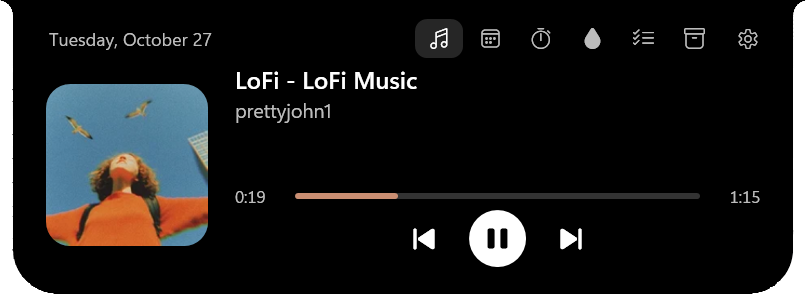
Now playing, from any app
Spotify, YouTube in the browser, anything that uses Windows media controls. Cover, progress and controls, plus synced lyrics that scroll with the song.
Your next meeting
Connect Google Calendar, read-only. "Standup in 8 min" appears in the closed notch, and Join opens Meet, Zoom or Teams.
A Pomodoro you can see
25 minutes of focus, 5 of rest, a long break every four. The countdown sits in the closed notch, or in a small bubble beside it while music plays, and it pauses itself when you walk away.
Small habits, kept
A daily water goal with gentle nudges. A task list where "Call Ana at 3pm" becomes a reminder, with optional two-way sync to Google Tasks.
A shelf for files
Drop files on the notch, drag them back out into any app later. Only the path is kept, nothing is copied.
What Windows is doing
Volume, brightness, battery, audio output, Caps Lock, keyboard layout and network. A dot lights up when an app is using your microphone.
Your scripts and agents, at a glance
A build, a download or an AI agent at work can show its progress in a bubble beside the notch with yata-cli, and tell you when it needs you. It all stays on your PC.
Named after a messenger.
In Japanese myth, Yatagarasu is the three-legged crow sent to guide the way. It's a cousin of Huginn and Muninn, Odin's ravens, who fly over the world and come back with news.
Yata does the same from the top of your screen. A 16 × 14 pixel raven, drawn by hand, lives in the notch and reacts to your day.
What leaves your PC
Only what you turn on. Nothing about your computer is ever sent.
| Feature | What is sent | To | Default |
|---|---|---|---|
| Synced lyrics | Artist, title and length of the song | LRCLIB | On |
| Weather | The city you chose, rounded to about 1 km. Never your IP location. | Open-Meteo | Off |
| Google Calendar and Tasks | Goes straight between your PC and Google. Access is encrypted on disk with Windows DPAPI. | Off | |
| New version notice | Nothing. Reads the public releases page once a day (or when you click Check now), and downloads the installer only when you click Update. | GitHub | Off |
| Activities from your scripts and agents | Nothing. They reach Yata through a local channel only your Windows user can open, and stay in memory. | — | On |
| Everything else | Nothing | — | — |
It never sees what you type
Caps Lock and keyboard layout are read by checking key state. There's no keyboard hook.
No account, no telemetry
The diagnostic log stays on your PC for 7 days, and it leaves out songs, tasks, events, file paths and accounts.
You can check all of it
Every line is on GitHub under the MIT license. This site has no trackers or cookies either. Full details in the privacy policy.
Before you install
Is Yata free?
Yes. It's free and open source under the MIT license, with no account and no ads.
Does it work on Windows 10?
Yes. It runs on Windows 10 version 2004 or later and on Windows 11, on x64 PCs.
Do I need a laptop with a notch?
No. Yata draws its own notch at the top of any screen, and with more than one monitor you choose which one it lives on.
Does it need admin rights?
No. It installs for your user only. The one exception: if the .NET 10 Desktop Runtime is missing, the installer downloads it from Microsoft, and that step asks for admin.
Why does SmartScreen warn about the installer?
The installer isn't code-signed yet, so Windows doesn't recognize it. Choose More info, then Run anyway, and compare the file with the SHA256SUMS.txt in the release. Every release is built by GitHub from the public code: see how to check a download.
Can Yata see what I type?
No. Caps Lock and keyboard layout are read by checking key state, and there's no keyboard hook. Every line of the code is on GitHub if you want to check.
Will it get in the way of games and videos?
No. It hides when an app goes full screen, and Ctrl+Alt+Y opens or closes it from anywhere.
Which music apps does it work with?
Any app that uses Windows media controls: Spotify, YouTube and other sites in the browser, and more. Synced lyrics come from LRCLIB and can be turned off.
Can my scripts or AI agents use the notch?
Yes. yata-cli activity set build --title "Build" --progress 40% shows a build, a download or an agent's progress in a bubble beside the notch, and attention tells you when it's waiting for you. It's a local channel that only your Windows user can open; nothing goes over the network.
- Installs for your user only, without admin rights.
- If the .NET 10 Desktop Runtime is missing, the installer downloads it from Microsoft. That one step asks for admin.
- Each release ships a
SHA256SUMS.txtso you can check the file you got, and a GitHub provenance attestation:gh attestation verify Yata-Setup-x.y.z.exe --repo akaneni/yataconfirms it was built from the public code. - The installer isn't code-signed yet, so SmartScreen may warn on first run. Choose More info, then Run anyway. To check the file first, see how to check a download.
- Uninstalling keeps your data, in case you come back.